
Overview
Segment Overlap helps marketing teams identify audience duplication across Eloqua segments and campaigns before communications are sent.
When multiple campaigns target the same contacts, it can result in audience fatigue, reduced engagement, duplicate messaging, and inefficient campaign execution. Segment Overlap provides visibility into these overlaps by analyzing contact membership across segments and campaigns, allowing marketers to make informed decisions before launching campaigns.
The feature supports both single-instance and Multi-instance Eloqua environments and enables users to analyze overlap in two ways:
- By Segment – Compare contact membership across selected Eloqua segments.
- By Campaign – Compare audience overlap between campaigns based on the segments associated with those campaigns.
By proactively identifying overlap, marketing teams can improve campaign planning, optimize audience targeting, and deliver a better customer experience.
Accessing Segment Overlap
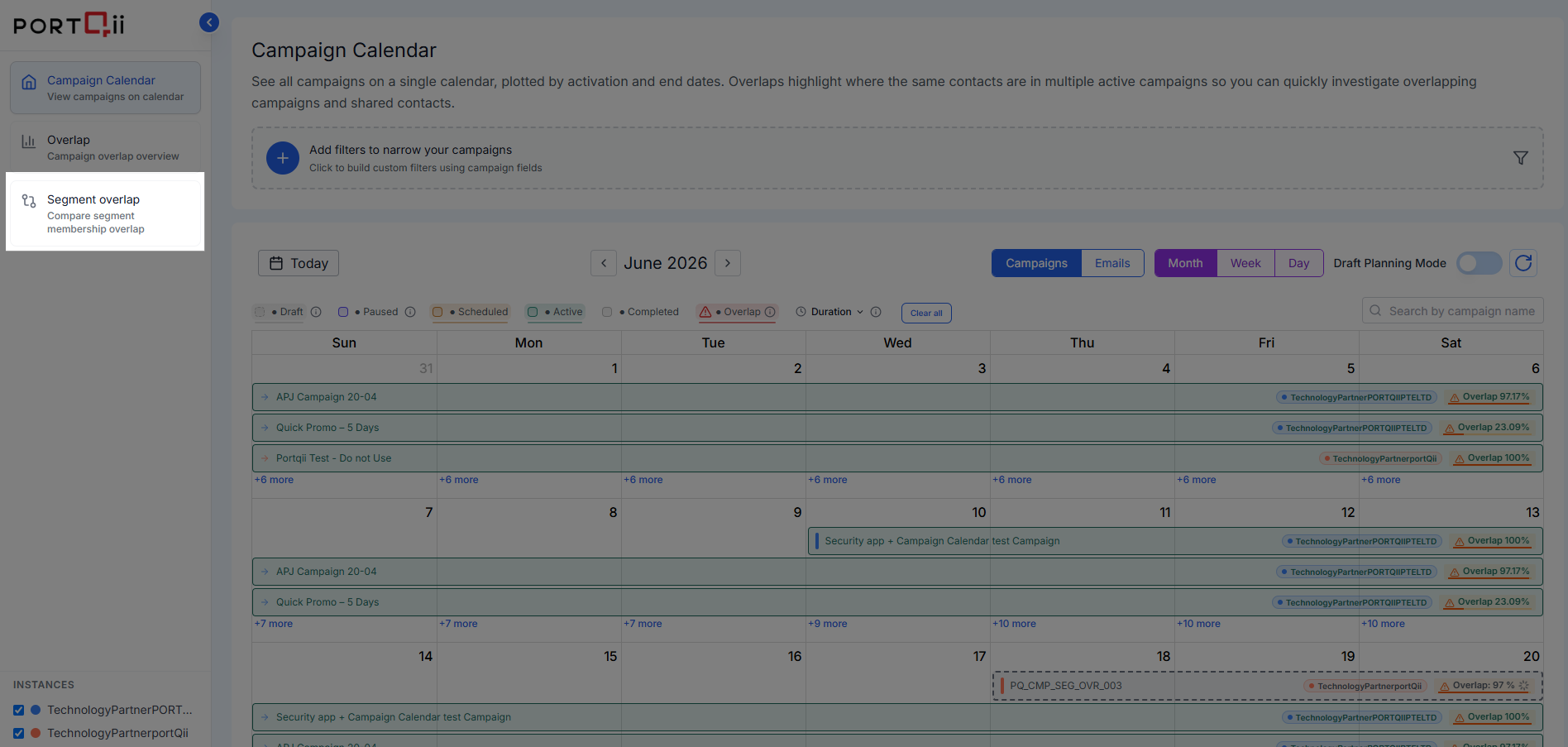
Segment Overlap is available from the Campaign Calendar navigation menu.
To perform an overlap analysis:
- Open the Segment Overlap page from the Campaign Calendar left navigation menu.
- Choose an analysis type:
- By Segment
- By Campaign
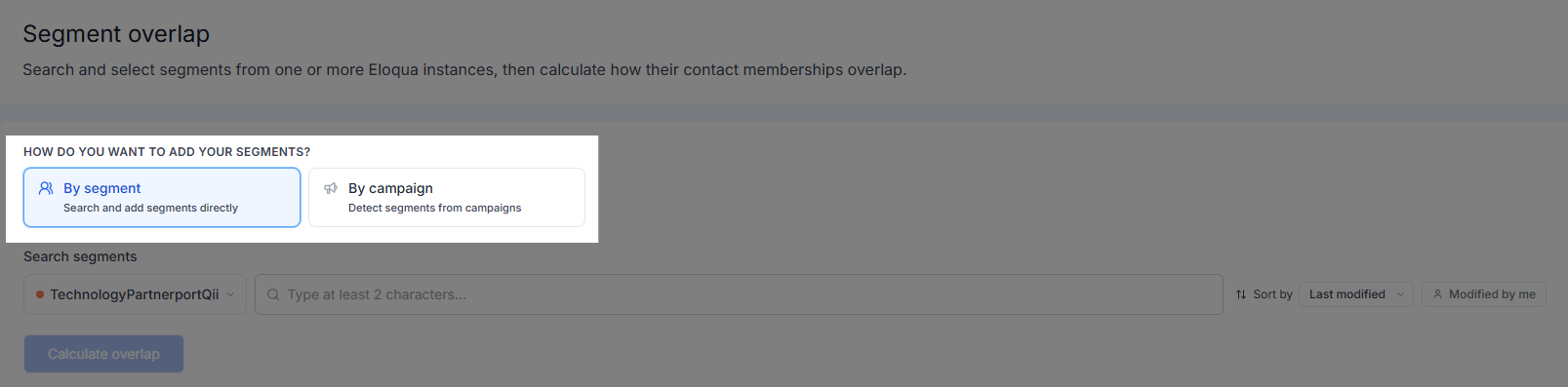
- Select the required segments or campaigns.
- Click Calculate Overlap.
- Review the overlap results and insights.
Segment Overlap by Segment
Use the By Segment option to compare contact membership across multiple Eloqua segments.
Accessing Segment Overlap Analysis
Step 1: Open Segment Overlap.
- Navigate to Campaign Calendar.
- Select Segment Overlap from the left navigation menu.
Step 2: Select the By Segment tab.
Step 3: Select segments.
- Choose the Eloqua instance containing the segments you want to analyze.
- Use the search field to locate a segment.
- Select the required segment from the search results.
- Repeat the process to add additional segments.
- Up to 25 segments can be included in a single analysis.
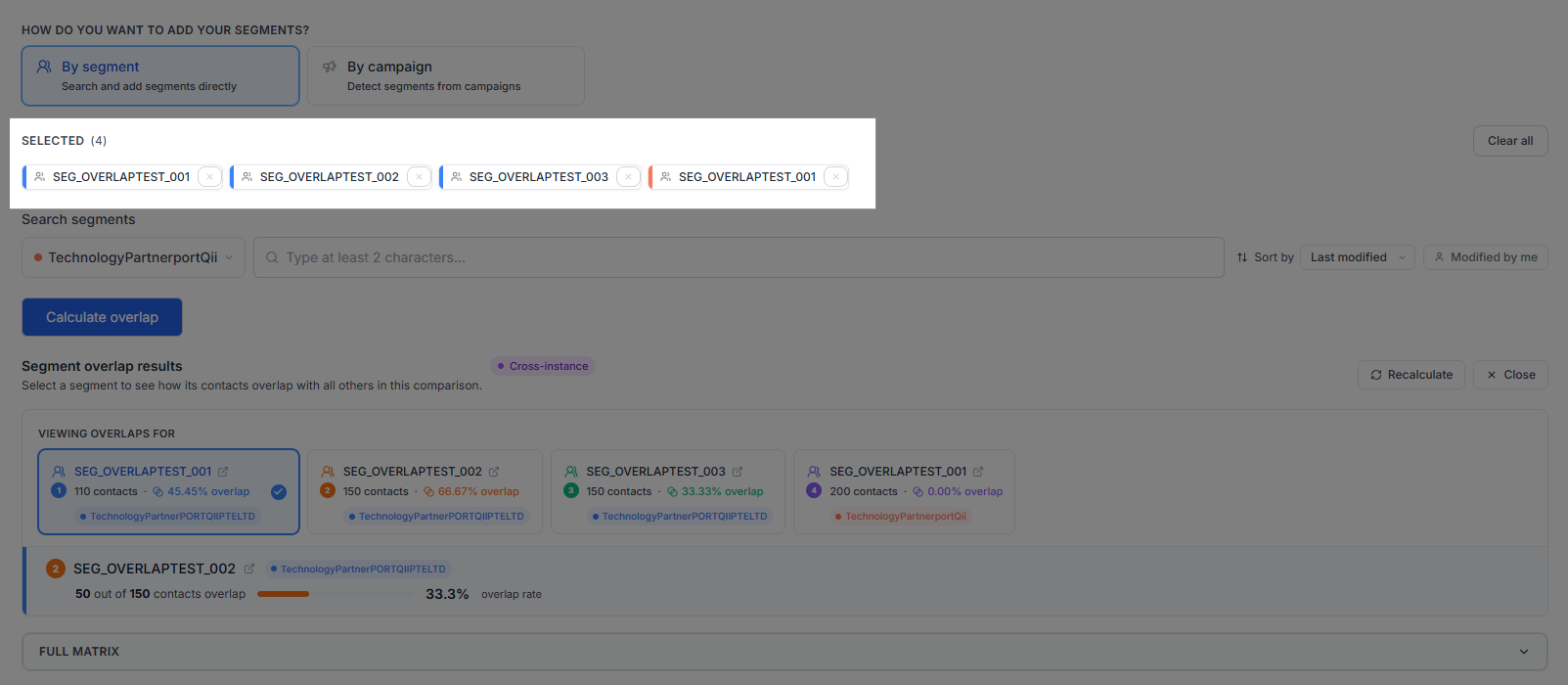
Step 4: Review the selected segments and click Calculate Overlap.
Viewing Overlap Results
Step 5: Review the overlap results.
After processing completes, the results display:
- Total contacts in each segment
- Number of overlapping contacts
- Overlap percentage between segments
- Segment-to-segment comparison details
These insights help identify audience duplication and potential communication conflicts.
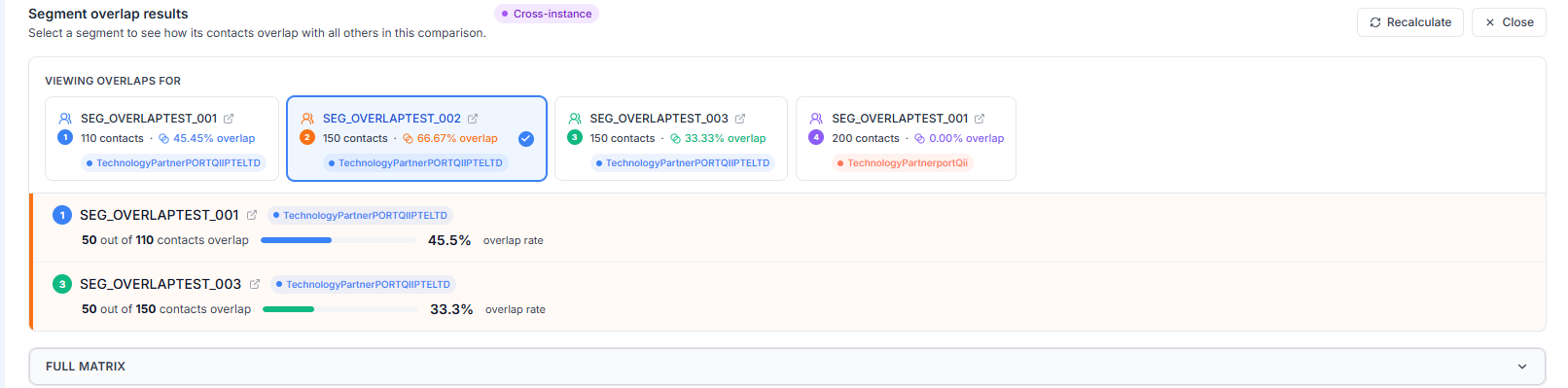
Step 6: View the overlap matrix.
The overlap matrix provides a consolidated view of overlap across all selected segments, making it easy to identify highly shared audiences and optimize campaign targeting.
Segment Overlap by Campaign
Use Segment Overlap by Campaign to analyze audience overlap across multiple Eloqua campaigns. This analysis helps identify shared contacts between campaigns, enabling marketers to reduce duplicate communications, prevent audience fatigue, and improve campaign planning.
Accessing Campaign Overlap Analysis
Step 1: Select Segment Overlap from the left navigation menu.
Step 2: Select the By Campaign tab.

Step 3: Choose how you want to add campaigns.
You can add campaigns using one of the following methods:
- Campaigns by Criteria – Automatically select campaigns based on defined criteria.
- Add Campaigns Manually – Select individual campaigns from your campaign calendar.
Adding Campaigns by Criteria
Use this option to automatically select campaigns that meet specific conditions.
Step 1: Specify a date range.
Select the From Date and To Date. The system identifies campaigns that fall within the selected date range.
Step 2: Configure additional criteria (optional).
Refine campaign selection using one or more of the following options:
- Include campaigns from multiple Eloqua instances.
- Only calculate overlap using campaigns with the same start date.
- Only calculate overlap using campaigns based on campaign length (number of days).
- Only calculate overlap using already applied campaign filters.
Note: The campaign filter option is available only when Campaign Calendar filters are currently applied.
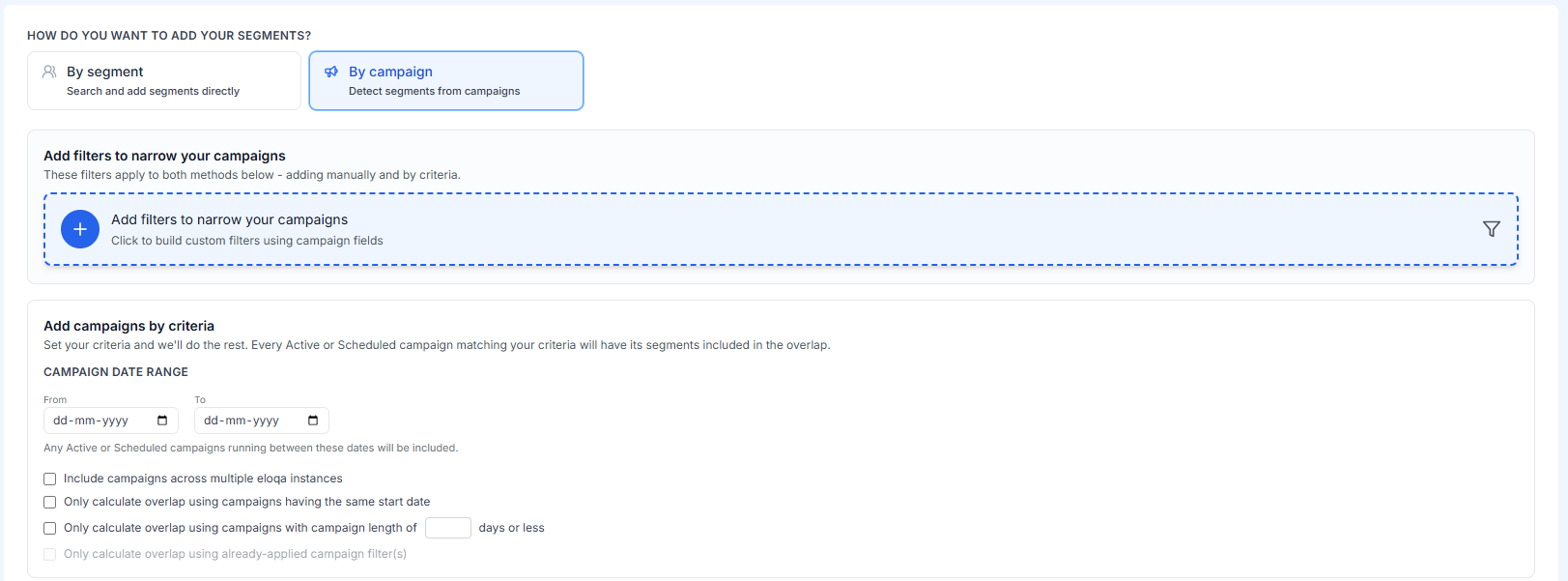
Step 3: Click Calculate Overlap.
If the selected criteria return more campaigns or segments than the supported limit, a notification is displayed. Refine the date range or campaign criteria and recalculate.
Adding Campaigns Manually
Use this option when you want complete control over which campaigns are included.

Step 1: Select a campaign status.
Choose the campaign types you want to include:
- Draft
- Active/Scheduled

Step 2: Select an Eloqua instance.
Step 3: Find campaigns.
Locate campaigns by:
- Searching by campaign name
- Sorting by Last Modified
- Sorting by Date Created
You can also enable Created by Me to display only campaigns you created.
Step 4: Select campaigns.
Step 5: Click Calculate Overlap.
Viewing Overlap Results
Step 1: Review the overlap summary.
After the analysis is complete, review the overlap summary for all selected campaigns.
Step 2: Select a campaign.
Use the available dropdown menu or campaign tabs to focus on a specific campaign.
Step 3: View overlapping campaigns.
For the selected campaign, review the list of campaigns that share audience members.
- Overlapping campaigns
- Shared contact counts
- Overlap percentages
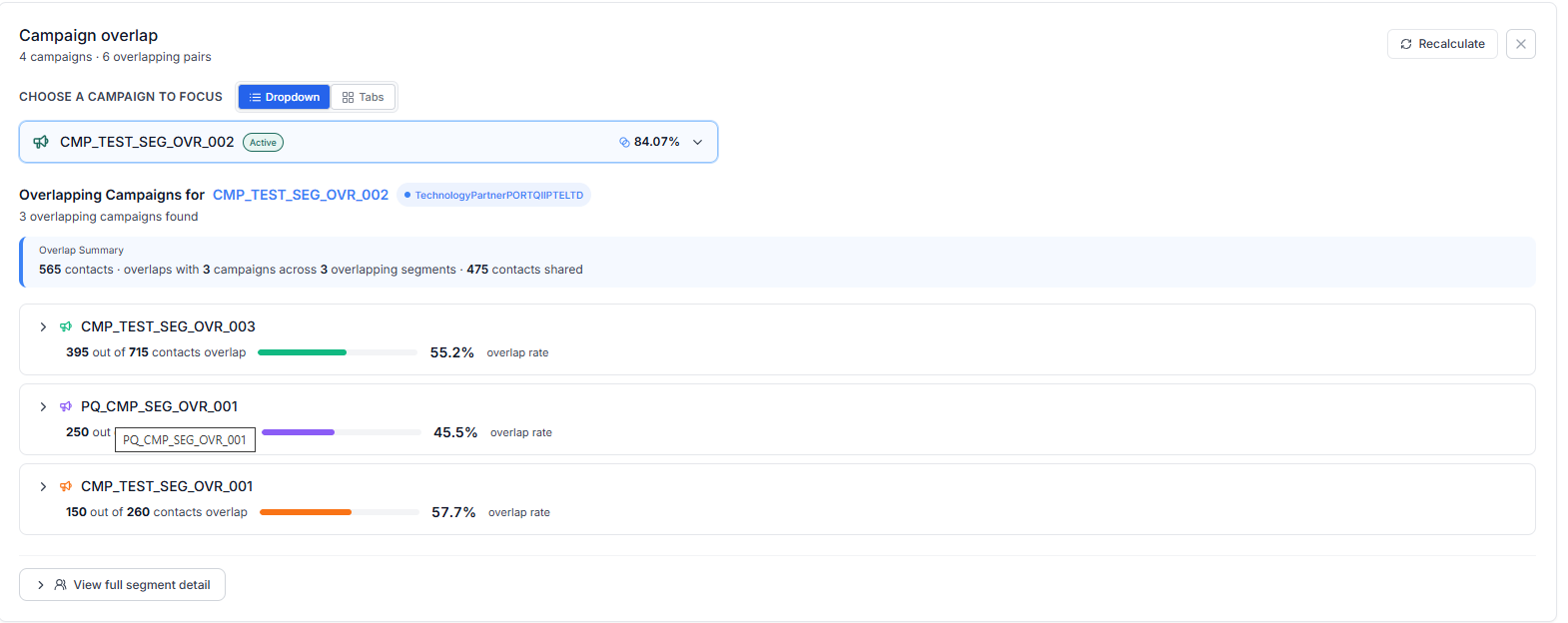
Step 4: Review segment comparisons.
View the segment comparison details for each campaign pair to understand which segments contribute to audience overlap.
Step 5: View segment details.
- Segment names
- Shared contact counts
- Overlap percentages
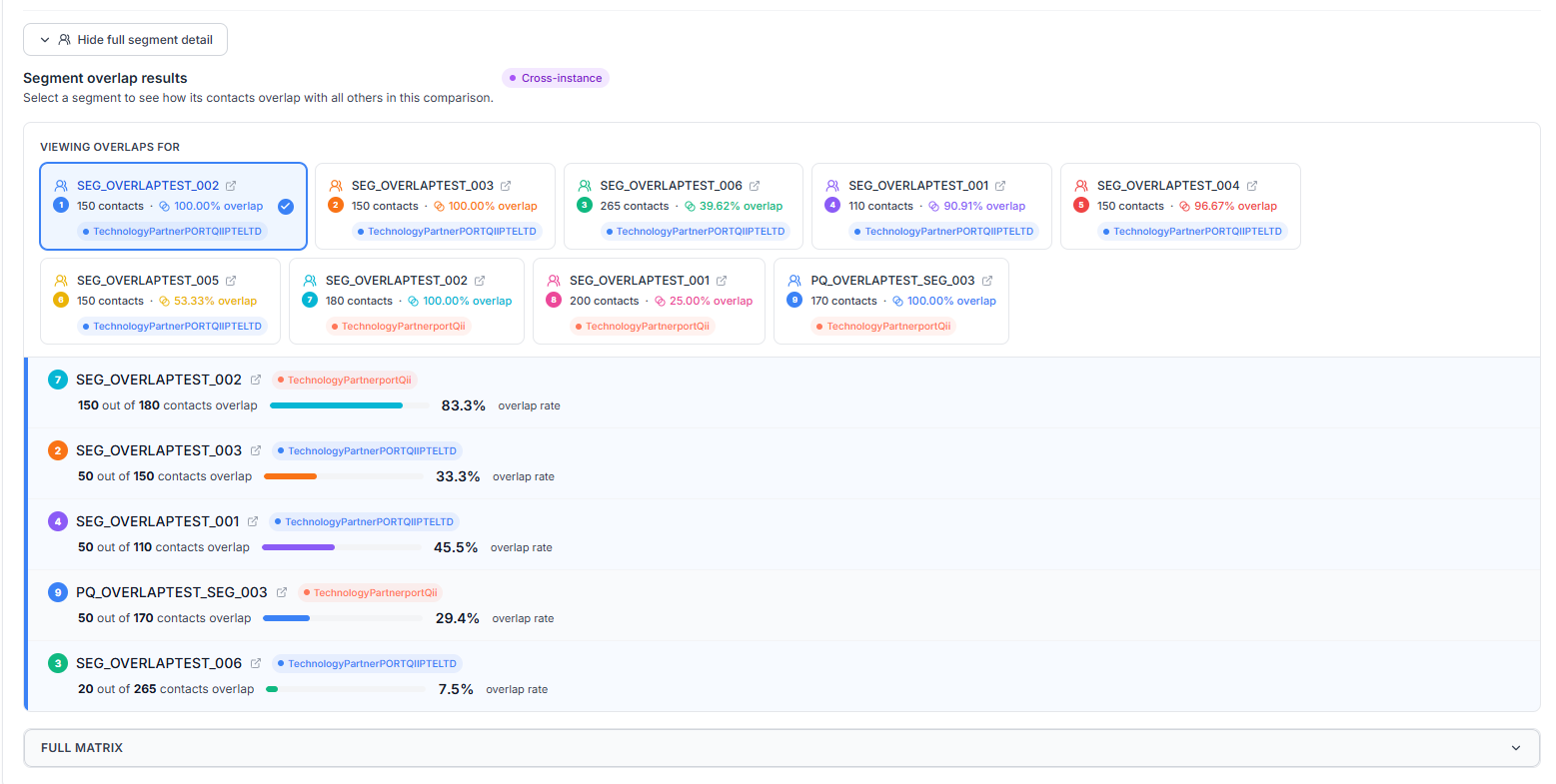
Step 6: Analyze overlap percentages.
Review overlap percentages to understand the degree of audience intersection between campaigns.
Step 7: View the overlap matrix.
Open the overlap matrix to view a complete comparison of audience overlap across all selected campaigns.
The matrix provides a consolidated view of campaign audience intersections and helps identify opportunities to improve targeting and campaign coordination.
Benefits
- Identify shared audiences across campaigns.
- Reduce duplicate communications.
- Prevent audience fatigue.
- Improve campaign planning and coordination.
- Optimize audience targeting.
- Make more informed marketing decisions.
Past Comparisons
Segment Overlap maintains a history of previously completed overlap analyses, allowing users to review and revisit past comparison results without creating a new analysis each time.
Past Comparisons by Segment
The Past Comparison by Segment section displays previously calculated segment overlap analyses.
Historical comparisons allow users to review previous analyses and revisit overlap results at any time.
For each comparison, users can view:
- Selected segments included in the analysis
- Number of segments compared
- Date the comparison was created
- User who created the comparison
- Segment overlap status
- Detailed overlap calculation results on expand

Past Comparisons by Campaign
The Past Comparison by Campaign section displays previously calculated campaign overlap analyses.
For each saved comparison, users can view:
- Selected campaigns included in the analysis
- Number of campaigns and associated segments
- Campaign status information (Draft, Active, or Scheduled)
- Eloqua instances included in the comparison
- Date the comparison was created
- User who created the comparison
- Overlap calculation results

Recalculate Overlap
Users can recalculate any past overlap calculations using the latest audience data.
When a comparison is recalculated:
- Current segment and campaign audience data is retrieved from Eloqua
- Overlap calculations are refreshed
- Results are updated with the latest overlap information
For campaign-based comparisons, users can also review the selected campaigns, criteria, and filters before recalculating the analysis.