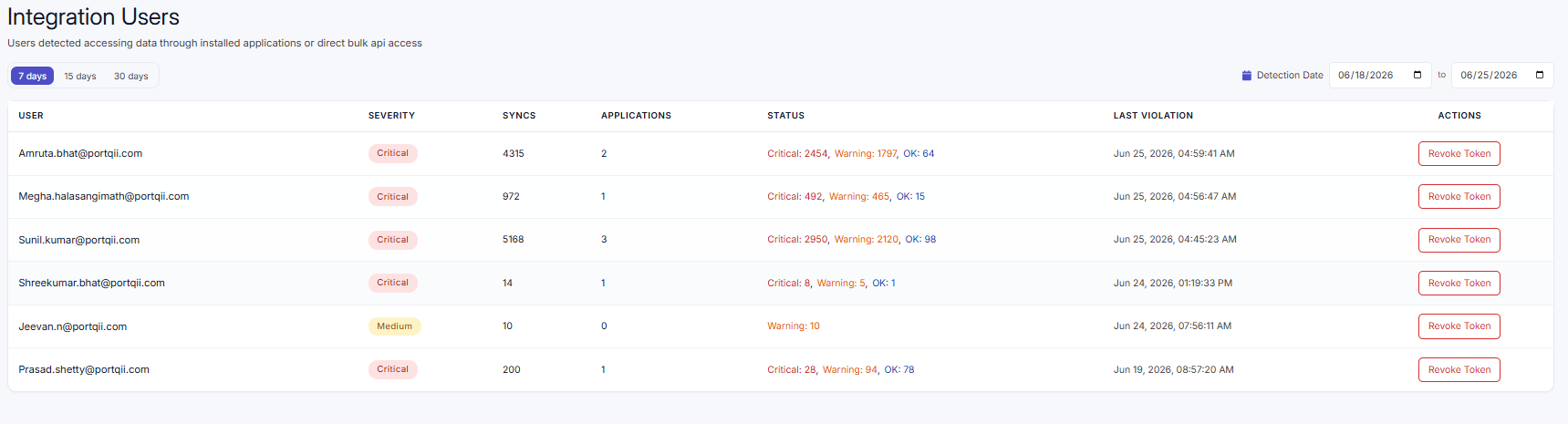
The Integration Users page lists the users detected accessing Eloqua data through app integrations and bulk API syncs. It combines each user's identity, activity summary, and compliance status in a single view, and provides administrative actions to revoke or restore access.
User listing
Users are shown in a table. Each row represents a user (identified by email) and includes:
| Column | Description |
|---|---|
| The user's email address. Click the row to expand it. | |
| Summary | Syncs and Applications counts, the Violations count (shown when there are any), and the Last violation time. |
| Status | A colour-coded Low, Warn, or Critical badge, with a breakdown of the contributing counts — (Critical: n, Warn: n, Low: n). Hovering a Critical badge shows a tooltip summarising the violation counts, the violation reasons, and the last violation time. |
| Action | Revoke Token when the user's token is active, or Enable User when it has been revoked. |
User-level details
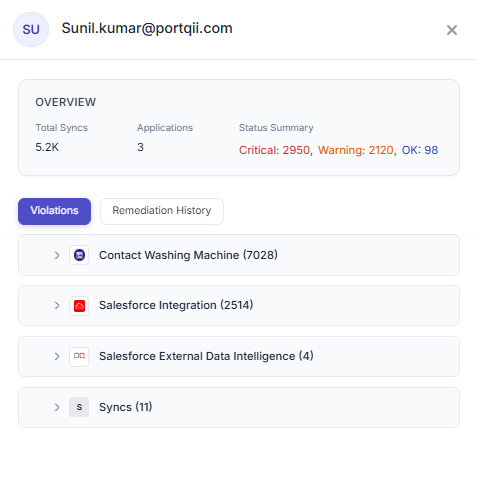
Click any user to expand the row. The user's activity is grouped by application, helping you evaluate whether their behaviour across multiple applications creates broader risk. Each application group shows:
- The application logo and name with its integration count — for example, “Asset Sync (3 integrations)”
- A Status badge and the Critical / Warn / Low breakdown
- The time of the most recent activity (“Last: …”)
- Violation reason(s) when the status is critical, with a “+ n more” / “View Less” toggle
Expand an application group to see its individual integrations, each with its own status, last activity time, and violation reason.
Selecting and pausing
Use the checkboxes to select individual integrations, all integrations for an application, or all integrations for a user. When one or more are selected, a bulk actions bar appears at the top showing “[n] integrations selected” with these actions:
- Pause Selected — pause monitoring/activity for the selected integrations
- Clear Selection — deselect everything