What assets does Campaign Orchestrator create in Eloqua?
Campaign Orchestrator creates temporary assets in Eloqua for specific operational needs. Here's what gets created and why.
Contact View
- Created manually during initial onboarding to display contacts involved in email campaigns
- This asset remains in Eloqua permanently
Shared List
- Campaign Orchestrator doesn't store personally identifiable information—only Eloqua Contact IDs. When you view contacts in an email instance, we create a temporary shared list using these IDs and generate a quick view with the Contact View created during onboarding
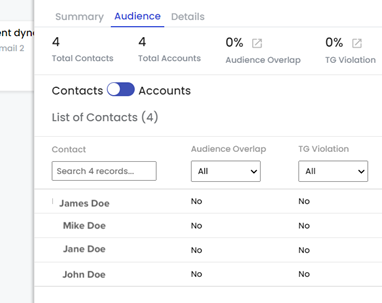
- This shared list is deleted immediately after contact details are retrieved
Program
- Programs capture the flow of decision steps. Once contact flow is captured, the program activates then deactivates
- These temporary programs help Campaign Orchestrator predict future email deployments for scheduled campaigns
- Programs are both deactivated and deleted when the process completes
Segment
- Created temporarily to track engagement-level steps like email clicks, sends, and opens
- Segments help predict future email deployments for scheduled campaigns
- Deleted when the process completes
Picklist
- Temporary picklist with added contacts that gets used in segments, allowing programs to include picklist contacts in the segment flow
- Helps predict future email deployments for scheduled campaigns
- Deleted when the process completes
What data does Campaign Orchestrator capture from Eloqua?
Campaign Orchestrator stores Eloqua data and asset metadata for operations.
Assets (Metadata)
Campaign
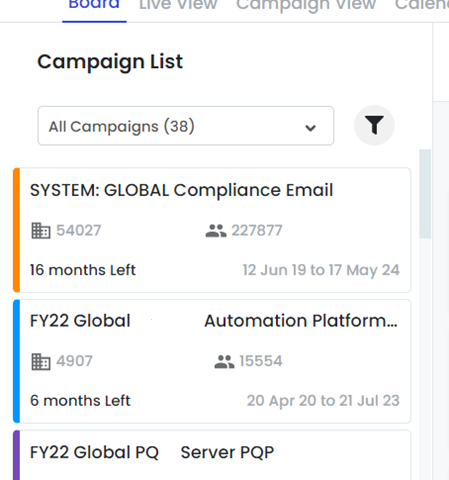
- We store all campaigns with email sends for one month from configuration date
- Continuous backup of campaigns that send emails
- Data points captured:
| Campaign ID |
| Campaign Name |
| Campaign Start Date |
| Campaign End Date |
| Campaign Status |
| Campaign Updated Date |
| Campaign Updated Date |
| Campaign Created Date |
| Campaign Created By |
Email Assets
Email assets display email instance cards in Campaign Orchestrator.
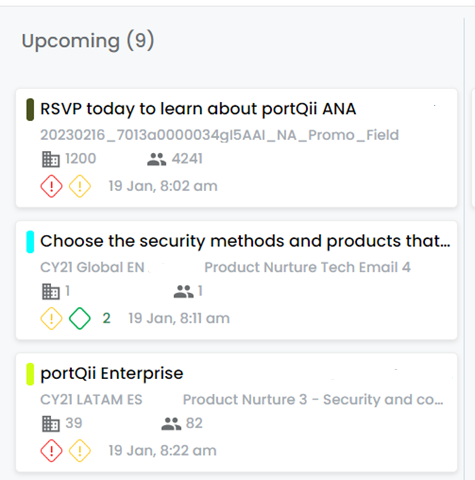
- We store all emails sent within one month of configuration
- Continuous backup of new emails being sent
- Data points captured:
| Email ID |
| Email Name |
| Subject Line |
| Email Group ID |
| Email Created By |
| Email Created Date |
| Email Updated By |
| Email Updated Date |
Email Groups
- Backed up with email assets to provide better filtering on the board
- Data points captured:
| Email group ID |
| Email Group Name |
| Display Name |
| Email Group Created By |
| Email Group Created Date |
| Email Group Updated By |
| Email Group Updated Date |
Segment
- Backed up with campaigns to provide better filtering on the board
- Data points captured:
| Segment ID |
| Segment Name |
| Segment Created Date |
| Segment Updated Date |
Campaign Field Value
- Campaign fields backed up with campaigns to provide better filtering on the board
- Data points captured:
| Campaign Field ID |
| Campaign Field Value |
| Campaign Field Data Type |
| Campaign Field Option List Id |
| Campaign Field Option List Values |
Email Sends
- Core data points that create email cards on the board. Used to populate instances and instance groups in Board View and Live View. Exported using bulk API
- Data points stored:
| Email Send Activity ID |
| Campaign ID |
| Email ID |
| Contact ID |
| Subject Line |
| Email Name |
Contacts
- Mapped to email sends and used to group into accounts. Displayed on email and campaign cards
- Data points stored:
| Eloqua Contact ID |
| Email Address Domain |
| Contact Created |
| Contact Modified |
Accounts
- Used to map contacts and display on campaign and email cards
- Data points stored:
| Eloqua Account ID |
| Domain |
| Company Name |
| Account Created |
| Account Modified |
Why does Campaign Orchestrator require username and password storage?
Campaign Orchestrator provides an air-traffic-controller view of campaigns running in your Eloqua instance. This requires multiple parallel API calls to Eloqua, but the industry standard OAuth 2.0 can fail in some scenarios. To ensure uninterrupted service, Campaign Orchestrator stores username and password as a backup authentication method when OAuth fails.
Can you skip storing username and password?
Yes, but with limitations. When OAuth fails without stored credentials, Campaign Orchestrator cannot synchronize data with Eloqua. You'll need to monitor constantly for such failures.
In future releases, we'll send notifications to the Eloqua administrator when this happens, and you'll need to reinstall the application to close the data gap.